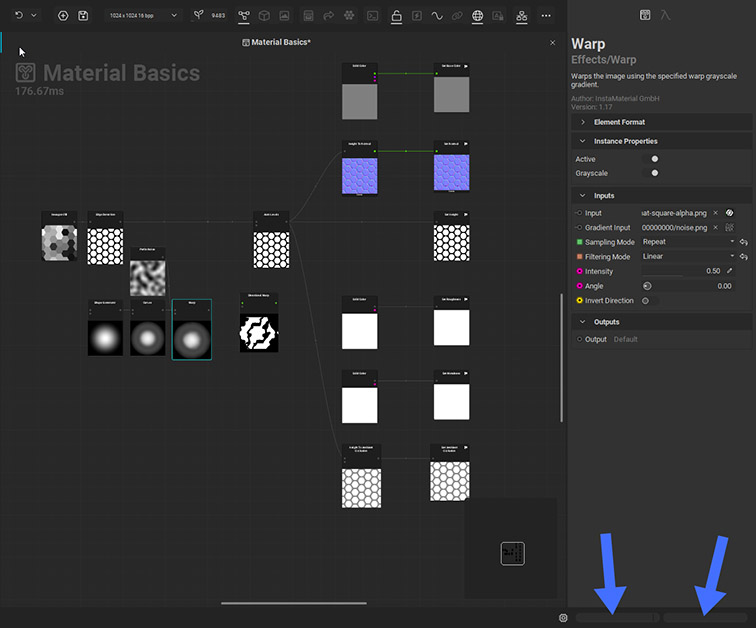
I would like to know if the fields pointed at in the image are both for “Video Memory Information”?
When I work in the Element Graph, Node Sliders and other controls start to jump in big increments after a while. It’s difficult to control them precisely, without doing it numerically.
Output Log has no warnings. Video memory for the graph in the image is using 49Mb out of 20172Mb total video memory.
I have observed a blue line running in the right field, pointed at in the image, many times when moving a slider. The left field stays empty at the moment.
I’ve read comments about Driver conflicts from other users. I already use the newest well functioning with Instamat drivers for an Nvidia RTX 20gb Gpu.
As you can see this graph does not have many nodes yet, and it’s at 1K, to improve performance a bit. Undos are down to 16.
I’ve also read on Copilot that it maybe related to Instamat being realtime??
Are there any guidelines on how to setup InstaMAT for better performance. Do you know about any guidelines about settings to change on Nvidia GPUs, other than drivers to work better with InstaMAT?
Thank you for the report! This is something we are currently looking into. Some people were able to fix this by installing older nvidia drivers with 566.36 seemingly being the most stable.
Is it possible for you to install this particular driver and report back if it fixed you issues?
Also, which particular nvidia GPU are you using? This info might help to narrow it down.
Thank you for your reply. I’m using a Nvidia RTX 4000 Ada Lovelace. The best working newest drivers in my case, are Version 582.41 - Released Tue March 10, 2026.
I made a search, and the 566.36 drivers are for GeForce. I don’t want to risk further problems with other apps, by using drivers made for different GPUs.
Thank you for confirming your GPU. I kinda suspected it when you mentioned 20GB. A user with the exact issue is using the same GPU. That will help a lot to investigate it.
Indeed, the drivers I mentioned are for GeForce cards, in this case you should not install those.
There are no general guidelines. Are you in our Discord by any chance? A user once made a list of system optimizations he made. I’d have to gather those and summerize, but in general, MAT is highly optimize and should be really snappy out of the box.
I’ve been looking around and want to point out that the GPU I use is a Nvidia RTX 4000 Ada Lovelace Generation, which is for workstations, CAD oriented. I’ve read that their drivers are more conservative and prioritize stability, ECC memory, certified CAD/DCC pipelines and predictable performance, but not aggressive real-time optimizations that GeForce drivers use for creative apps.
As you said you are looking into this issue, it might be something affecting other workstation GPU’s.
I see if I can find the optimizations the user made, but again, InstaMAT should be pretty snappy out of the box without the need for any system optimizations in general. The cause for your issue has to be something different I think.
The other user I mentioned who was facing the same issues as you seem to use the exact same GPU as you do. There might be something weird going on with this particular GPU + drivers + MAT. Searching the net, there are indeed users having similar issues with the particular card and different software. From what I could find after a quick google search, NVIDIA released a driver that should have fixed that. However, said driver was released about 2 years ago and you are using a newer one.
It seems to be a tricky issue. What I just found in the NVIDIA forums, can you try to turn off the “Threaded optimization” setting in the NVIDIA control panel and report back if anything changed?
I tried Threaded Optimisation> on a few days ago, because it was off in Nvidia Control Panel Graphics Settings. It produced something like a “Destroyed saving path” warning so I could not save anymore. It’s back off.
At the moment I have Maximum Performance and Low Latency on. Texture Filtering Quality is not accessible in my case. I don’t know if it’s better yet, because I’m short on free time lately.
I don’t think it’s a GPU card performance issue, because graphic feedback about GPU usage in Task Manager did never peak when UI became stuttery, even without Maximum Performance enabled.
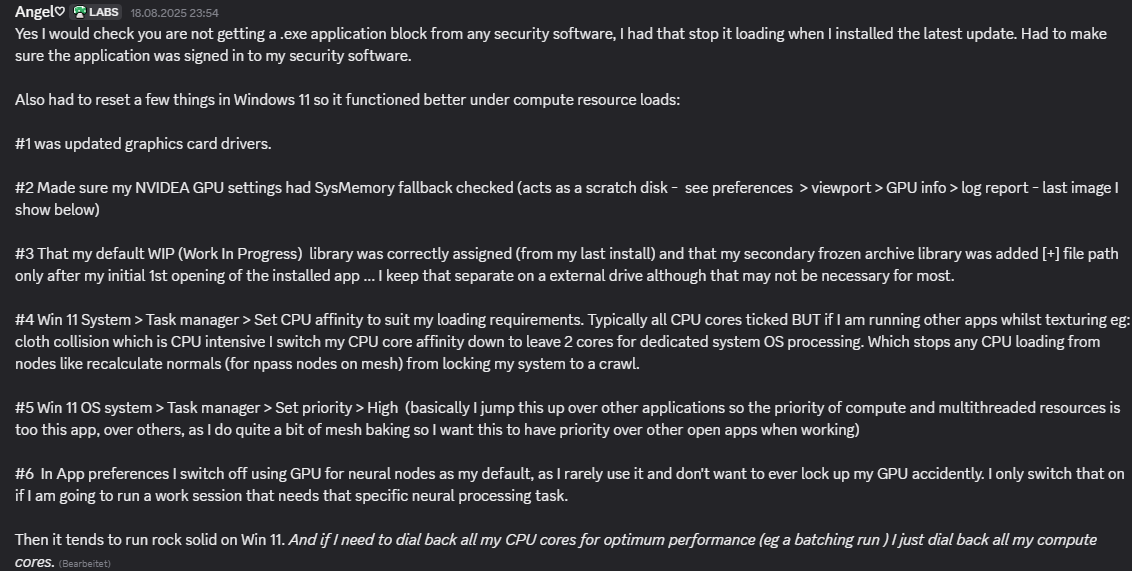
Thanks for checking! We will dig into this. Here is something a user wrote in Discord about optimizations. I never tried that, so no guarantees on this: