AR mode falsely reported as "not compatible" – but works fine via QR-code link (same device)

Hi,

There seems to be a bug related to the AR mode in Polyverse:

When opening the AR viewer directly from an iPad, the website shows a message stating that the device does not support AR. However, when following the exact same link embedded in the QR code, on the identical device, AR mode launches without any issues.
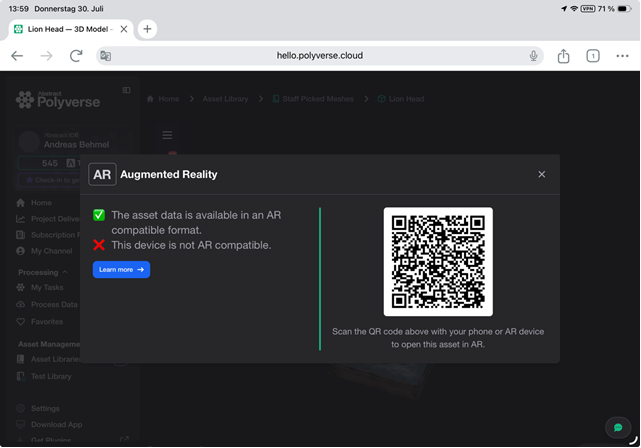
Hello @asj,

It looks like you are using Chrome on the iPad. The popup should show an option to enter the AR view when using Polyverse with Safari.

Thanks!

Hi @Pixby

Thanks for the reply! I don’t think Chrome vs. Safari explains this though :face_with_raised_eyebrow:

If I take the exact same QR-code URL and open it directly in the very same Chrome browser on the very same iPad, AR launches without any problem. So Chrome on this device clearly is capable of AR - it’s only the initial check triggered from the “AR” button in the viewer that (incorrectly) reports “This device is not AR compatible”.

That looks more like the compatibility check behaving inconsistently between the “AR button in the viewer” path and the “direct QR target URL” path, even though both run on the identical device/browser.

1 Like

Hello again @asj,

Thanks for the clarification. The team was able to reproduce the behavior and has implemented a fix. Could you please try it again?

Thanks!

1 Like

Hi @Pixby

Confirmed - just tested it - no more false “not AR compatible” message. :tada:

Thanks to you and the team for the quick fix!

2 Likes

Great! Glad to hear it!