I’ve been using InstaMat with Pioneer license since March 2026. Suddenly today i get an error that says Machine not Licensed. I have tried everything to reauthorize. I have a valid Pioneer license but it says 0 of 1 seats, even though I’ve used it for months. I has had an InstaLOD license which now appears gone.
I relogged in to the website, checked my license, downloaded a new copy of InstaMat and installed and get the code to enter. After doing so, I’m told to accept Terms & Conditions, which fails to open.
My Pioneer license shows active, but my machine cannot authorize and no license file is created. The Terms & Conditions file fails to load, and the activation list shows 0 devices. This appears to be a stuck or ghost activation. Could you please manually reset my activations on your end?
Hello! I have an active InstaMAT Pioneer license, but on my new computer I get the error: “You have an active pioneer licence and are not eligible for another.”
My license management page shows Seats 0/1, and there is no option to deactivate any device.
Could you please check my account and manually reset/unlock my Pioneer license activation so I can use InstaMAT on my new computer?
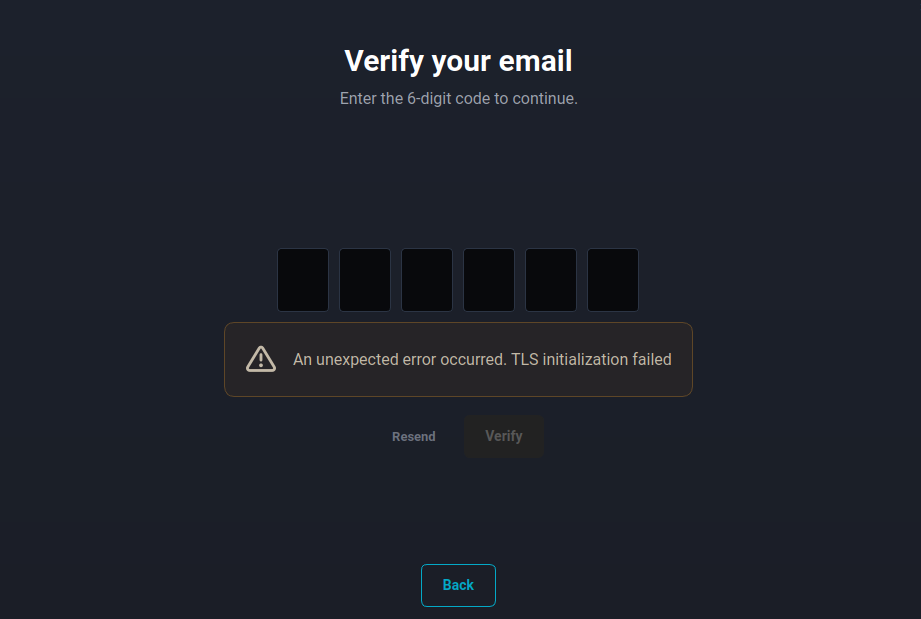
I just downloaded on Linux, anytime I try to activate the pioneer license it throws “An unexpected error occured. TLS initialization failed”- Which wouldn’t be a problem if I could claim a pioneer license on the website, which according to old videos seems to be how it use to work.
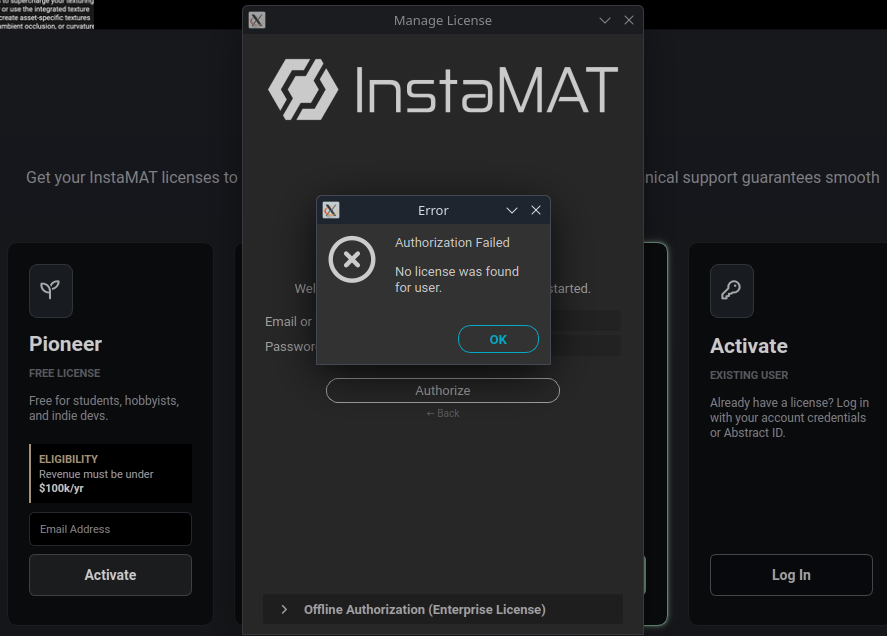
Signing in with “Password” works, but then the authorization fails, as I have no license found for the user. Trying to claim a pioneer license from the website, as far as I can tell, only redirects you to download the program where the TLS fails again, which makes an unusable loop. Start trial also fails TLS.
The documentation says you can download the pioneer license at any time from the Instamat pricing page, but again, that just prompts you to download the software.
This is unfortunately a known issue currently. While we are working on a fix, there are users on our Discord that were able to help with this issue in the past. Maybe this would be something you’d like to check out?
I’ve been experiencing a similar issue. I recently installed instaMAT, and when I open the app, it tells me this machine is not authorized to use instaMAT. I get to the point where it sends me a confirmation code, and when I input the code, it tells me, “ Failed to load license terms. Please check your connection and try later. I’ve waited more than a day, and my connection is fine, and it keeps telling me the same thing.
I am having the same issue. Interestingly, if I turn on a VPN, then it works, but I can’t leave that on since it is just a free one and only allows limited MB of data. As soon as I turn it off, I get the unlicensed issue again. Maybe this will help narrow the problem down?
Hello! I’m also experiencing the Pioneer license activation issue.
My account shows that I have an active Pioneer license, but when I try to activate it in InstaMAT Studio, I receive:
“Authorization Failed
License not started.”
I’ve tried releasing my machine’s seat through the website and attempting activation again, but the issue persists. When I try to release the seat, I also receive:
“Selected machines are not deactivatable due to the floating license agreement.”
I’ve seen that other Pioneer users have reported similar problems, and that a licensing fix was deployed recently. Unfortunately, I’m still unable to activate my license.
Eventually I was able to release my machines seat, but the error still occurred when I tried activating my account through the app again.
Reinstalling the app did nothing, and the same issue still arises.
Also, using a VPN or switching networks seemed to have no effect.
Could someone from the InstaMAT team check my account and see whether my activation needs to be reset or unlocked on your end?
Update: After a day of waiting suddenly my InstaMAT license works. It seems like the license just needed some time to activate? I’m not fully sure what the issue was, but time seems to have fixed it.